
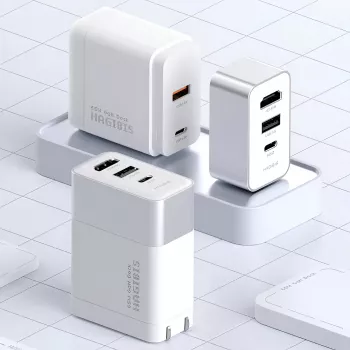
A travel bag can fill up fast when you’re juggling a USB-C Fast Charger, a display adapter, and a separate dock. A compact charger-dock solves that by combining a 65W GaN fast charger with a 4K HDMI dock in one unit—so handheld consoles and USB-C laptops can stay powered while connecting to a TV or monitor with fewer cables and fewer “where did I pack that?” moments.
This style of accessory is built around a simple idea: merge USB-C Power Delivery charging and HDMI display output into one travel-friendly device. It’s especially useful in setups where wall outlets are limited and desk space is tight.
The headline feature is 4K HDMI output for TVs and monitors. Real-world resolution and refresh rate depend on three things working together: the source device’s capabilities, the display’s supported modes, and cable quality. Many devices will negotiate the best shared format automatically, but it’s normal to need a quick settings check if a screen stays blank.
| Step | What to do | Why it matters |
|---|---|---|
| 1 | Use a high-quality HDMI cable (shorter is often more reliable) | Reduces signal issues at higher resolutions |
| 2 | Connect HDMI to the display first, then plug in power | Helps some devices negotiate display and power correctly |
| 3 | Confirm the display input and resolution settings | Avoids blank screens caused by mismatched settings |
| 4 | Keep the dock/charger ventilated | Maintains performance and prevents heat-related throttling |
GaN (gallium nitride) charging is popular because it can deliver strong power in a smaller, lighter package than many traditional silicon chargers. The “65W class” is a sweet spot for travel: enough for many USB-C laptops, handheld PCs like the Steam Deck, and fast-charging phones and tablets.
For a deeper look at how compatible devices negotiate charging levels, USB-IF’s overview of USB Power Delivery is a helpful reference: USB Power Delivery (USB PD) Specification Overview (USB-IF).
| Device type | Expected outcome | Notes |
|---|---|---|
| Steam Deck / similar handheld PCs | Charge while playing in many scenarios | Heavy games plus high brightness may slow charge rate |
| Nintendo Switch | Power and TV output when supported | Use the correct dock mode and compatible cables |
| Ultrabooks (USB-C PD) | Charge at normal speeds | May slow under CPU/GPU-heavy workloads |
| Phones/tablets | Fast charging | Charging speed depends on device protocol support |
Most “it doesn’t display” or “it charges slowly” problems come down to device-side support. Before expecting HDMI output, verify the USB-C port on the source device actually supports video (DisplayPort Alt Mode, Thunderbolt, or USB4) and that the device is allowed to output video while charging.
For background on common HDMI bandwidth expectations, HDMI Licensing’s overview can clarify what “4K” modes typically involve: HDMI 2.0 Specification Overview (HDMI Licensing Administrator). For Switch-specific charging guidance, consult official support materials: Nintendo Switch AC Adapter and Charging Information (Nintendo Support).
Yes—GaN is a more efficient semiconductor used inside the charger, not a separate charging standard. Real performance depends on USB-C Power Delivery negotiation, the wattage your device can accept, and using a quality USB-C cable; if charging seems slow, try a different PD-rated cable and reduce heavy load while charging.
The main tradeoffs are that compact GaN chargers can run warm under sustained high wattage, and results vary by design quality and the cables/devices connected. GaN doesn’t automatically mean higher wattage—your device still needs to support the charging profile and draw it safely.
A USB-C Fast Charger is compatible with a wide range of devices, making it a versatile addition to your tech collection.
A USB-C Fast Charger is not just a convenience; it’s a necessity for today’s fast-paced digital lifestyle.
Embrace the benefits of a USB-C Fast Charger and elevate your daily charging routine to the next level.
The reliability of a USB-C Fast Charger is unmatched, ensuring that you can charge without downtime during your busy days.
With the convenience of a USB-C Fast Charger, you can easily keep your tech devices powered and ready whenever you need them.
Invest in a USB-C Fast Charger today and enjoy the seamless charging experience it offers for all your compatible devices.
A USB-C Fast Charger can help you stay ahead of the curve as technology advances, providing the robust performance needed for modern devices.
Embracing a USB-C Fast Charger can enhance your charging experience by ensuring faster power delivery and better performance.
For those who often find themselves on the go, a USB-C Fast Charger is an essential tool for maintaining connectivity with all your gadgets.
Using a USB-C Fast Charger can lead to a more organized workspace, eliminating the clutter of various chargers for different devices.
One of the significant advantages of a USB-C Fast Charger is its ability to quickly power up your devices, maximizing your productivity.
For gamers, using a USB-C Fast Charger can mean the difference between a fully charged device and a frustrating low-battery warning during critical moments.
When traveling, a USB-C Fast Charger can be a game changer, ensuring that your devices are always ready to go without the hassle of multiple cables.
Investing in a USB-C Fast Charger means investing in the future of charging technology. Stay ahead with fast and reliable charging solutions.
Choosing a USB-C Fast Charger allows you to charge multiple devices simultaneously without sacrificing power. Experience the benefits of one charger to rule them all!
With a USB-C Fast Charger, you can enjoy quicker charging times and enhanced efficiency for all your devices. It’s a must-have accessory for anyone who values convenience.










Leave a comment