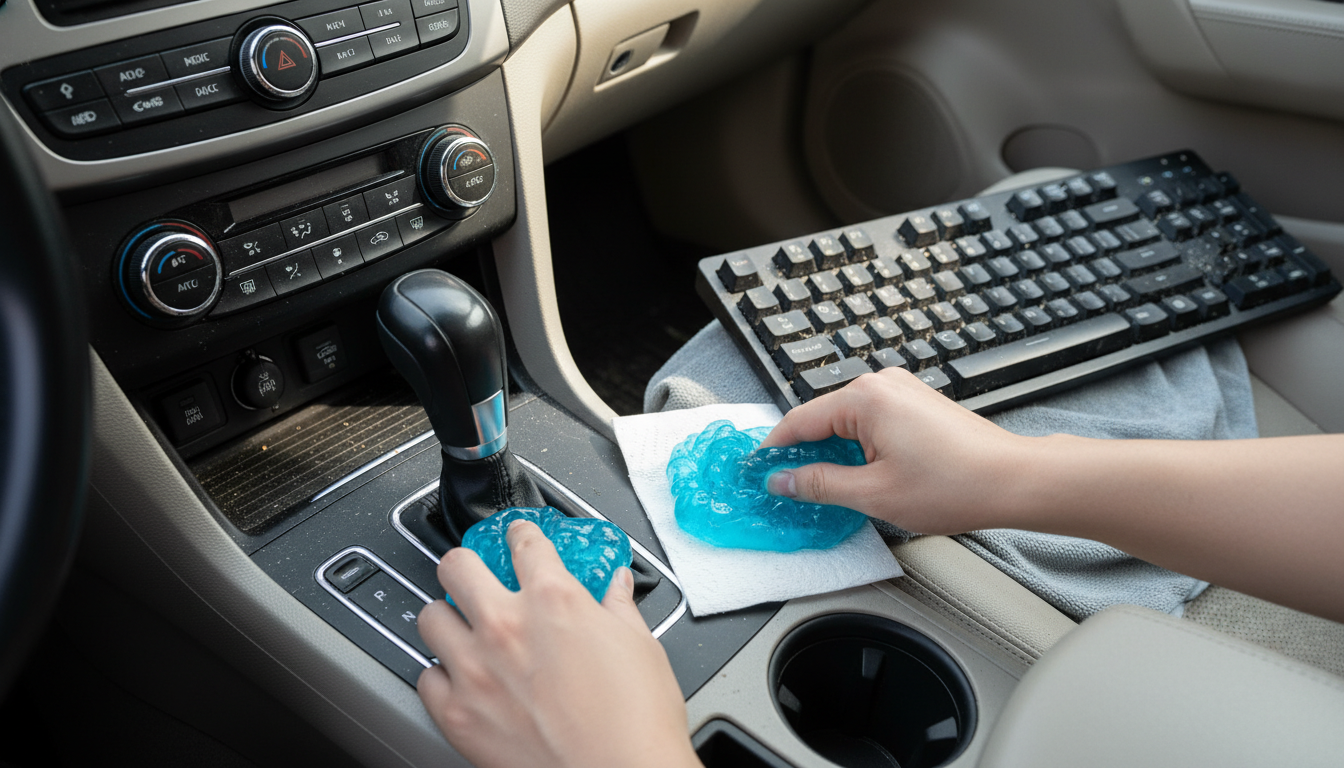
Using Keyboard Cleaning Gels not only improves the cleanliness of your workspace but also contributes to a healthier environment. Dust and allergens can accumulate in keyboards, triggering allergies or respiratory issues. Regular cleaning with gels can significantly reduce these particles, leading to better air quality. Furthermore, maintaining a clean keyboard can enhance your productivity; a clean workspace can lead to improved focus and efficiency. In addition to health benefits, using cleaning gels can also help maintain the aesthetic appeal of your devices, making them look new for longer.
When selecting a keyboard cleaning gel, consider factors such as the ingredients, texture, and intended use. Non-toxic and biodegradable products are preferable for those who are environmentally conscious. Additionally, check for reviews or recommendations to ensure that the gel performs well. Many consumers find that gels with a firmer texture work better for lifting larger debris, while softer gels can be more effective for fine dust particles.
In summary, Keyboard Cleaning Gels are an effective tool for maintaining cleanliness and hygiene in your workspace. They offer a simple and efficient way to keep your keyboard free from dust and debris without the need for elaborate cleaning routines. However, it’s important to pair their use with other cleaning methods for best results, especially when dealing with sticky residues. By integrating Keyboard Cleaning Gels into your cleaning habits, you can ensure a more pleasant and productive working environment.
Yes—keyboard cleaning gels can work well for picking up loose dust, crumbs, and gritty debris that sits on top of keys and in the gaps around them. The gel behaves like a soft, tacky putty: when you press it gently onto the surface, it conforms to the spaces between keys and pulls particles back up when you lift it away. For instance, many users find that using these gels not only helps maintain the cleanliness of their keyboards but also extends the life of the device. Regular use of cleaning gel can prevent buildup, which might lead to malfunctioning keys or a less responsive typing experience.
Cleaning gel is best for dry, lightweight messes and hard-to-reach crevices. It’s especially useful for quick maintenance on mechanical keyboards, laptop keyboards, and other textured surfaces where a cloth can’t easily reach. That said, results depend on technique: use light pressure, dab rather than smear, and work in small sections so the gel doesn’t spread debris around. For example, a common practice is to clean between the keys of a mechanical keyboard after every few weeks of regular use, which can help maintain its appearance and functionality. Many users have reported significant improvements in cleanliness and performance after implementing this simple routine.
Cleaning gels aren’t a cure-all. They won’t reliably remove sticky residue from spilled drinks, oily buildup from hands, or grime that’s adhered to keycaps. They also won’t disinfect a keyboard unless the product specifically states it contains a disinfectant (many are simply tacky compounds designed to grab particles). For anything wet, sticky, or germ-focused, pair gel with safer methods like compressed air and a lightly dampened microfiber cloth (with electronics-safe cleaning practices). For example, if you spill coffee on your keyboard, the gel alone won’t suffice; you should first clean the area with a cloth and then use the gel for thorough dusting afterwards.
Start by powering down and unplugging the keyboard (or shutting down a laptop). Press the gel gently onto the keys and edges, then lift straight up. Avoid rubbing aggressively, which can push gel into seams or leave bits behind—especially on worn, cracked, or heavily textured keycaps. If the gel looks dirty or starts feeling overly soft or stringy, retire it; reusing saturated gel can transfer grime back onto your keyboard. It’s also wise to note that some users recommend using cleaning gel on other electronic devices like remotes and game controllers—just be sure to follow similar safe practices.
For a broader walkthrough on using cleaning gel across keyboards, laptops, and even car vents—plus practical do’s and don’ts—read the full guide here: https://gskbuy.com/guide-cleaning-gel-cars-laptops-keyboards-dust-tips/. This guide offers detailed insights on the best cleaning practices and product recommendations, ensuring that you can keep all your devices clean and functioning optimally.
Yes, as long as you use gentle dabbing (not pushing) and avoid forcing gel into openings. For heavy dust buildup, use gel as a finishing step after compressed air. Cleaning gel can be particularly effective for laptop vents, helping to remove dust without worrying about damaging the sensitive internals.












Leave a comment